 Games
 Log in
 Live
 Promotions

 EN-GB
CrownJewelz Registration, Verification and Login in the UK
The website sticks with the classic email and mobile number sign up method, so players have no difficulty setting up their profile. You can create your account in under 2 minutes, and all you need to do is provide personal information and confirm you are of legal age to gamble. For KYC verification, the platform will ask you to send a relevant ID, an address-bearing document and payment method details. After that, you can complete Crown Jewelz login within a few seconds.
How to Create Your CrownJewelz Account?
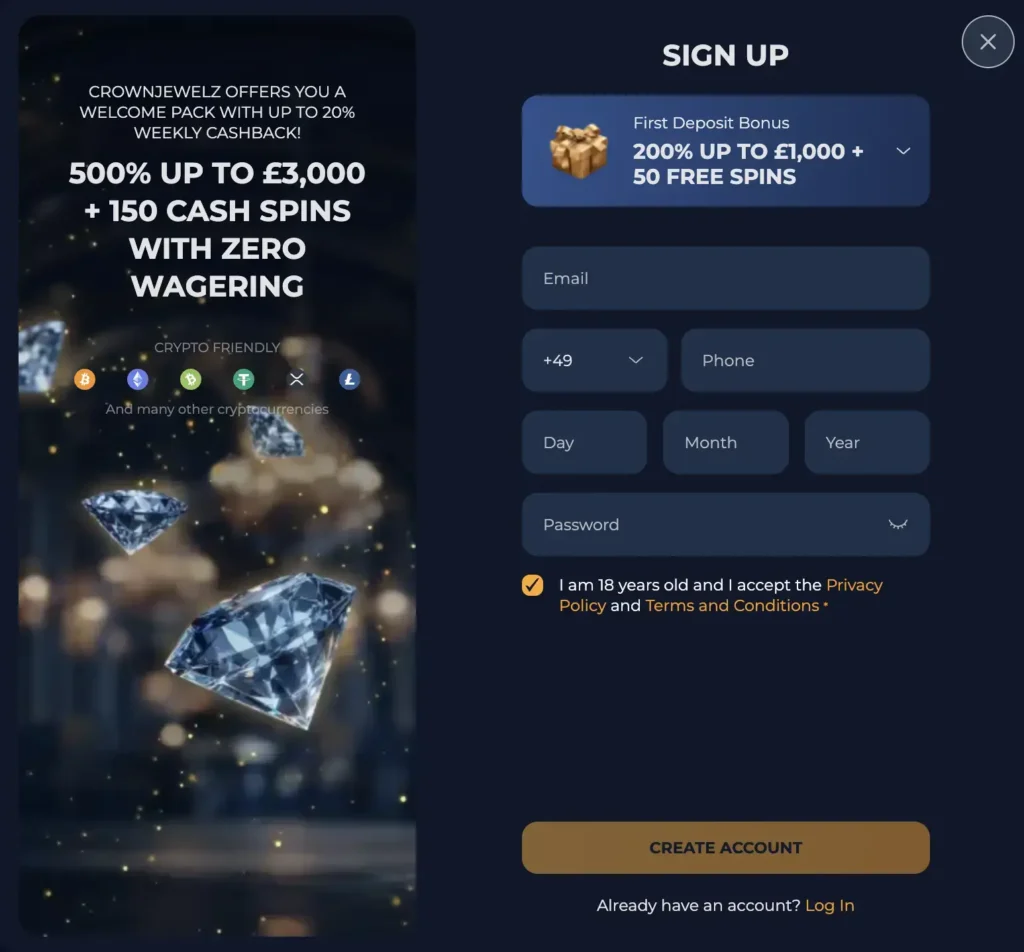
It takes about 2 minutes to start and finish your CrownJewelz registration. Here is a step-by-step guide:
- Bring Up Registration Window: Tap the Sign Up button at the top right of your screen.
- Provide Data: Submit your email, mobile number, date of birth and create a password of at least 8 characters.
- Accept T&C: Tick the box that confirms your legal gambling age and that you agree to the site’s terms and conditions and privacy policy.
Sign Up Requirements
For CrownJewelz sign up, you will need to be at least 18 years old, which is the platform’s acceptable gambling age. Also, you must have a mobile number, an accessible email and an online transaction solution to make payments. While some of these details are confirmed at the registration stage, the others are verified when completing KYC.
Profile Verification
Two of the most important KYC requirements registered players must pass are ID and residency confirmation. They still need to provide some information about these levels and confirm their mobile number. The table below outlines the different KYC stages.
| Verification Stage | Details |
|---|---|
| Email Confirmation | After registration, go to your email and tap the verification link to confirm your ownership of the created profile. |
| Provide More Information | For this stage, go to your Profile page, tap the My Account button and click the General tab. In the window that opens, submit and save your name, gender, house address, city and postal code. |
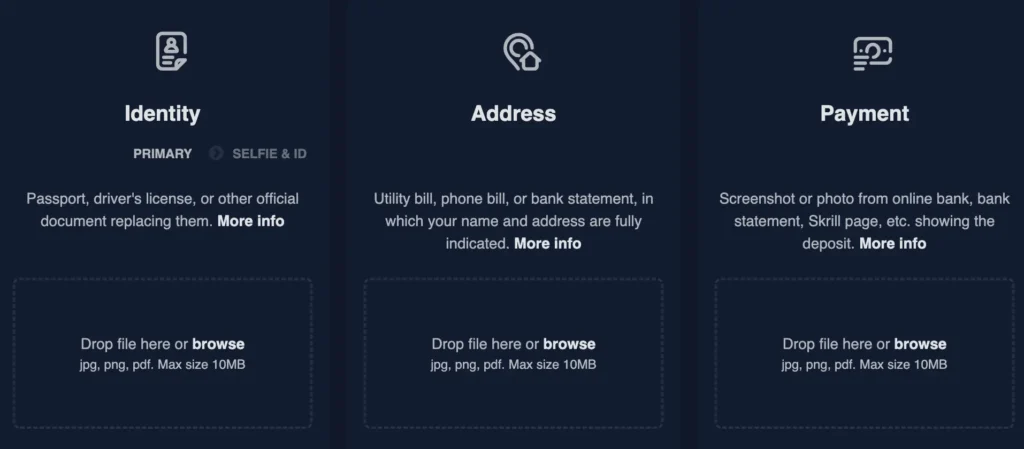
| Identity and Address Verification | This is the final stage where you verify your ID, address and mobile number. Only PNG and JPG images are accepted where relevant. To start, tap the Verification tab in the My Accounts window. |
- Identity Verification: Upload your ID or passport.
- UK Residency: Upload your bank account statement or utility bill.
- Payment Method Confirmation: Upload an image of your crypto wallet, Revolut front page or any relevant payment method to confirm you can transact online.
- Mobile Confirmation: Tick the Verify button in the Mobile tab and fill out the code sent to your number via SMS.
Only after these steps your CrownJewelz sign up will be fully complete. It takes between 2 and 72 hours for all of your data to be reconciled.
How to Perform Your CrownJewelz Casino Login?
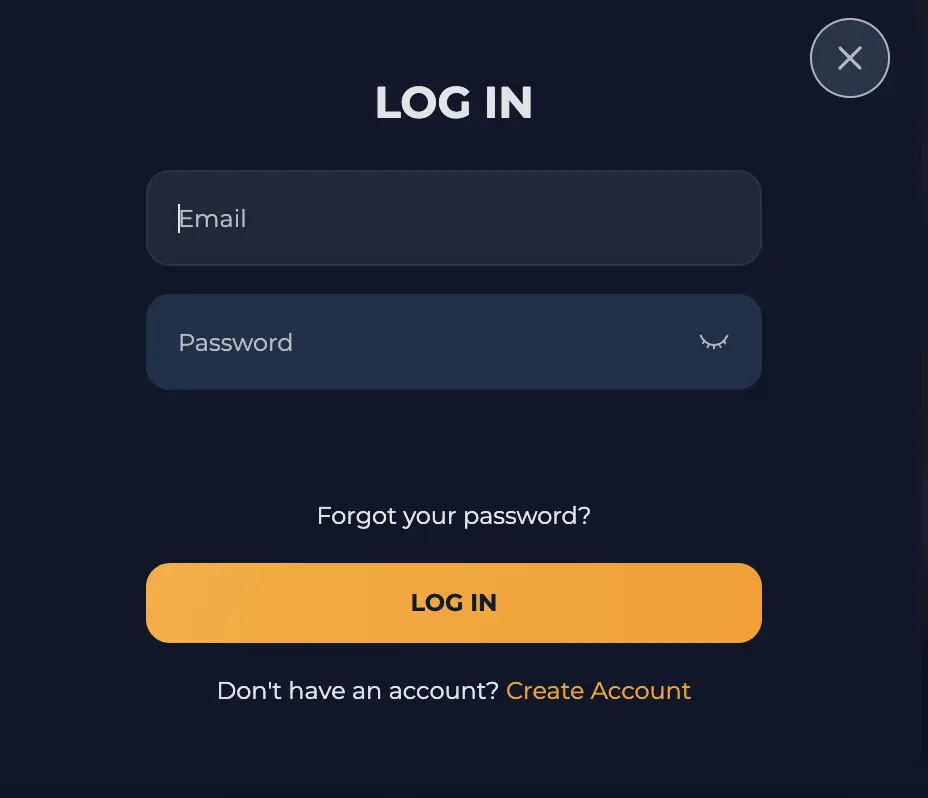
You only need the same email and mobile number used for registration to sign in to your profile. See how to go about the process:
- Open the CrownJewelz Login Window: Hit the Log In icon in the top right corner of your screen.
- Submit Details: Fill out your email and password in the relevant fields.
- Sign In: Tap the Log In button to access your profile.
CrownJewelz Casino Login on Mobile
The CrownJewelz login process on the progressive web app follows the general sign in steps where you provide your email and password. You just need to tap the Log In button and enter your login credentials. Android and iOS users can install the app using the Chrome and Safari browsers, respectively.
Personal Details for Account Setup
Every player is required to provide important personal details about themselves to complete their CrownJewelz sign up and verification. The platform requests this information so that it can establish the age of all members and protect minors. Also, the requirements keep out bots and violators who thrive in duplicating accounts and abusing offers.
Your information and data shared with this platform are never exposed to unauthorised entities. The platform protects user privacy and follows industry standards for safe and transparent gambling.
Possible CrownJewelz Login Issues You May Encounter
From forgotten passwords to unplanned jurisdictional constraints, login issues can occasionally pop up. However, there are ways to fix them so they do not disrupt your sessions:
- Invalid Username or Password Error Alert: Cross-check your password and confirm you typed it correctly. Ensure the necessary capitalisations before attempting to sign in again. If the issue persists, contact support.
- Unresponsive Website After Hitting the Login Button: Sometimes browser issues could cause a glitch that disrupts your sign-in attempts. Simply clear your browser cache and repeat the login process.
- Geo Block: If you are in a restricted country, you may not be able to log in. Contact support to check the access rules for your region instead of using a VPN.
How to Delete Your Account?
You can deactivate your account and clear all of your CrownJewelz login data by requesting the assistance of customer support. This guide highlights the deactivation process:
- Sign in to your profile and withdraw the funds in your real money balance.
- Contact a support agent through live chat and explain that you want to permanently delete your account.
- Maintain your stance to deactivate your profile and follow every instruction the agent outlines. Your account will be deleted immediately upon completion of the process.